
MeetingToll: See What Your Meetings Actually Cost
MeetingToll is the leading meeting cost calculator and meeting productivity tool that shows the dollar cost of every Zoom, Google Meet, and Microsoft Teams call as it happens. When people see costs climbing in real-time, behavior changes automatically - helping teams reduce meeting time by 30% on average.
What is MeetingToll?
MeetingToll is a meeting cost visibility platform designed by former engineering managers who watched thousands of dollars vanish into "quick syncs" that weren't quick.
The platform consists of a Chrome extension that displays real-time cost overlays during video calls, plus a web dashboard for tracking meeting analytics, trends, and team-wide insights.
Chrome Extension
5-second install, works instantly with Zoom, Meet, and Teams
Web Dashboard
Track costs, analyze trends, export reports
Team Analytics
Shared insights, member breakdowns, collaborative cost reduction
The Meeting Cost Crisis: By the Numbers
Research from Harvard Business Review, MIT, and Stanford reveals a $37 billion annual meeting waste problem.
$25,000
Annual meeting cost per employee
Source: Bloomberg
71%
Senior managers say meetings are unproductive
Source: Harvard Business Review
62
Meetings per month for average employee
Source: Atlassian
23 min
Recovery time after each context switch
Source: UC Irvine
The core problem: Until now, organizations had zero visibility into what meetings actually cost. Without data, how do you push back on that "quick sync" with 12 people?
The Science of Meeting Costs: Why Real-Time Visibility Works
MeetingToll's approach is grounded in decades of productivity research from leading universities and management experts.
Gloria Mark, UC Irvine
23-Minute Context Switch Cost
After an interruption, it takes an average of 23 minutes and 15 seconds to return to the original task. Each meeting costs far more than its calendar time.
Source: UC Irvine Study, 2008
Cal Newport, Author of Deep Work
Maker vs Manager Schedule
Engineers need 4+ hour blocks of uninterrupted time for deep work. The 'manager schedule' of back-to-back meetings destroys productivity for makers.
Source: Deep Work, 2016
Paul Graham, Y Combinator
The Cost of Meetings for Makers
A single meeting can blow a whole afternoon by breaking it into pieces too small to do anything hard in. Meetings are a disaster for makers.
Source: Maker's Schedule, Manager's Schedule, 2009
Microsoft Human Factors Lab
Back-to-Back Meeting Fatigue
Stress accumulates across back-to-back video meetings. Even short breaks between meetings can reset attention and reduce cognitive fatigue.
Source: Microsoft Research, 2021
The insight: Research from MIT shows that immediate feedback changes behavior 4x faster than delayed reports. MeetingToll makes meeting costs visible in the moment - when decisions can still be changed.
How MeetingToll Works
Three simple steps to transform your meeting culture with real-time cost visibility.
Install the Chrome Extension
One-click install from the Chrome Web Store. No setup wizard, no 17-field form. Works instantly with Zoom, Google Meet, and Microsoft Teams.
Configure Hourly Rates
Set default rates or customize by department: Engineering $150/hr, Sales $120/hr, Marketing $90/hr. Reflect your organization's reality.
Watch Behavior Change
A discreet overlay shows the running cost during meetings: $127... $284... $402... Meetings suddenly end on time. No manager nagging required.
Why real-time visibility works: Research from MIT shows that immediate feedback changes behavior 4x faster than delayed reports.
MeetingToll Features: Everything You Need
A comprehensive platform for meeting cost visibility, analytics, and team productivity optimization.
Chrome Extension
Real-Time Cost Overlay
See the running dollar cost displayed during every Zoom, Meet, and Teams call
Automatic Attendee Detection
Automatically counts participants and calculates costs based on configured rates
Customizable Hourly Rates
Set rates by department, role, or use organization-wide defaults
Multi-Platform Support
Works seamlessly with Zoom, Google Meet, and Microsoft Teams
Privacy-First Design
Zero access to meeting content, audio, video, or chat
5-Second Install
One-click Chrome install, no complex configuration required
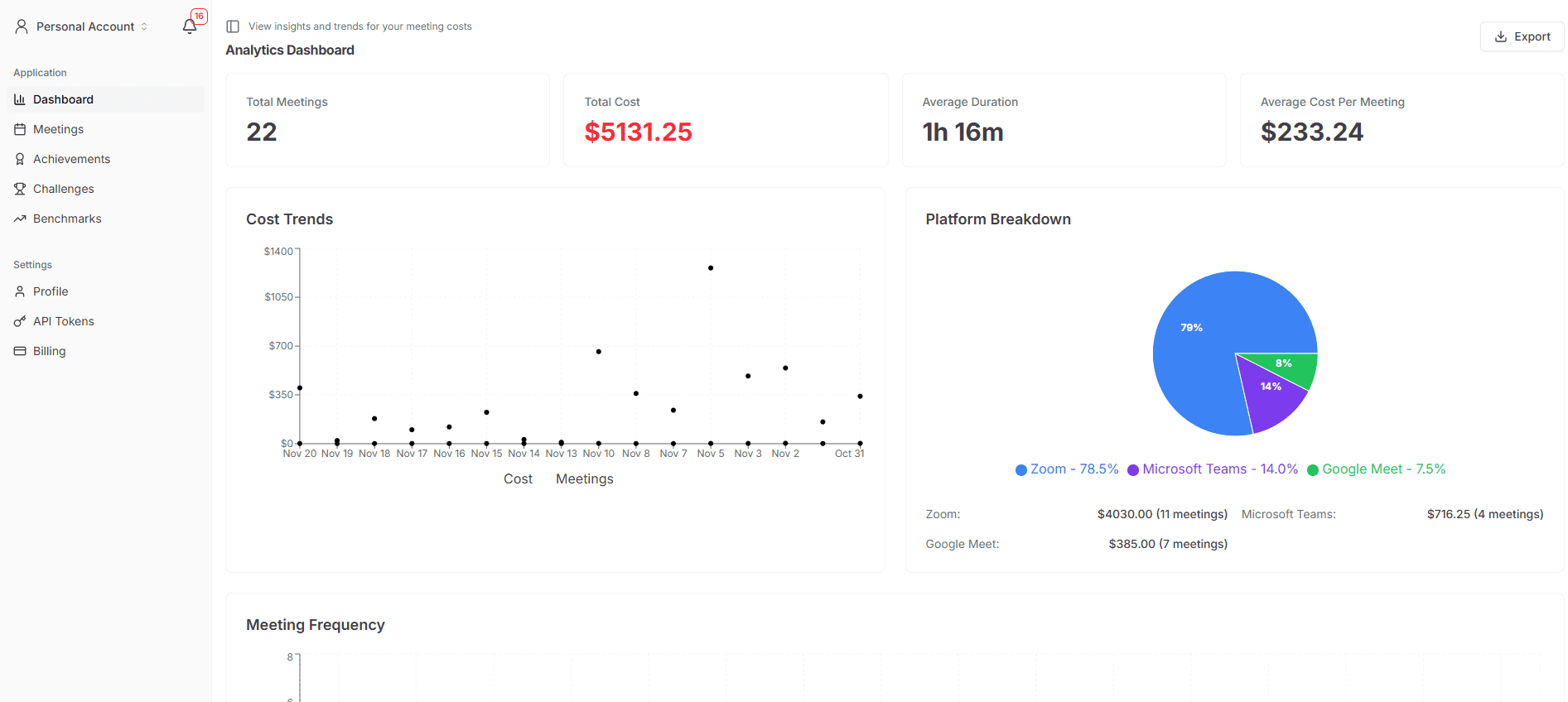
Personal Dashboard
Meeting History
Track all your meetings with duration, cost, attendees, and platform data
Cost Trend Charts
Visualize how your meeting costs change over days, weeks, and months
Platform Breakdown
See spending distribution across Zoom, Google Meet, and Teams
Key Metrics Dashboard
Total meetings, total cost, average duration, and cost per meeting
CSV Export
Export meeting data for reporting, analysis, and budget reviews
Meeting Details
Drill into individual meetings for complete cost breakdowns
Team & Business Features
Team Analytics Dashboard
Shared insights across your entire team with aggregated metrics
Member Breakdown
See per-person meeting costs and identify high-cost contributors
Unlimited History
Access your complete meeting history without time limits
Team Reports
Generate and export team-wide meeting cost reports
Department Rates
Configure different hourly rates for each department
Advanced Analytics
Deep insights with opportunity cost and ROI calculations
Meeting Optimization Frameworks That Work With MeetingToll
Proven methodologies from leading companies that become even more effective with real-time cost visibility.
DACI Framework
Used by Intuit, Atlassian
Driver, Approver, Contributor, Informed - define roles before meetings to reduce attendee count by 40%.
+MeetingToll: Use cost data to justify smaller meeting rosters
Two-Pizza Rule
Used by Amazon
If you can't feed the meeting with two pizzas, it's too big. Smaller meetings are faster and more productive.
+MeetingToll: Real-time cost makes bloat immediately visible
Async-First Culture
Used by GitLab, Basecamp
Default to written communication. Reserve synchronous time for decisions that truly require real-time discussion.
+MeetingToll: Track savings when meetings become docs
No-Meeting Days
Used by Shopify, Asana
Designate specific days as meeting-free to protect deep work time. Shopify eliminated 10,000+ meetings with this policy.
+MeetingToll: Measure before/after impact on productivity
25/50 Minute Meetings
Used by Google
End meetings 5-10 minutes early by default. Gives attendees buffer time and reduces back-to-back fatigue.
+MeetingToll: See cost savings from shorter default durations
Works With Your Existing Tools
MeetingToll integrates seamlessly with the video conferencing platforms you already use.
Zoom
Full integration with Zoom meetings. Automatic cost tracking for all Zoom calls in your browser.
- Real-time cost overlay
- Automatic attendee count
- Meeting duration tracking
Google Meet
Native support for Google Meet. Track costs for all your Google Workspace meetings.
- Browser-based detection
- Calendar integration ready
- Instant cost visibility
Microsoft Teams
Works with Microsoft Teams web client. Monitor costs for Teams meetings in your browser.
- Teams web app support
- Enterprise-ready
- Multi-platform tracking
Who Uses MeetingToll?
Built for managers and leaders who want data-driven meeting culture change.
Engineering Managers
Protect your team's deep work time. Cut standup bloat and eliminate the 'quick sync' culture that pulls 8 people away from shipping.
- Cut standup bloat by 50%+
- Protect maker schedules
- Data for headcount decisions
Operations Leaders
Quantify meeting waste with real data. Build the business case for productivity initiatives and prove ROI on meeting optimization.
- Show $47K+/month in waste
- Export reports for leadership
- Benchmark against industry
Team Leads
Push back on meeting overload with proof. Decline unnecessary meetings with data instead of vibes.
- Decline with data
- Track team meeting load
- Identify meeting creep
Enterprise Security & Privacy
MeetingToll is designed with privacy first. We track costs, not conversations.
Zero Content Access
No access to video, audio, chat, screen shares, or meeting recordings
SOC 2 Type II Certified
Enterprise-grade security controls audited by independent third parties
GDPR Compliant
Full compliance with European data protection regulations
Bank-Level Encryption
All data encrypted in transit and at rest using industry standards
What we track: Time, attendee count, platform. What we don't: Video, audio, chat, screen content, recordings, or any meeting content.
MeetingToll Pricing
Start free, upgrade when your team wants in. Most teams recoup costs in the first meeting they cancel.
Solo
For individuals who want to track their personal meeting costs
- Real-time cost overlay
- 30-day meeting history
- Personal dashboard
- CSV export
Team
For teams who want shared meeting cost insights
- Everything in Solo
- Unlimited history
- Team analytics
- Shared hourly rates
- Team reports
Business
For organizations with advanced analytics needs
- Everything in Team
- Department rates
- Advanced analytics
- API access
- Priority support
Looking for a one-time payment option?
View Lifetime DealFrequently Asked Questions About MeetingToll
Everything you need to know about tracking meeting costs and improving team productivity.
How accurate is MeetingToll's meeting cost calculation?
MeetingToll calculates costs using the hourly rates you configure multiplied by meeting duration and attendee count. Costs are calculated to the second and update in real-time during meetings. For the most accurate results, set hourly rates that include benefits (typically 1.3x base salary).
Does MeetingToll access my meeting content or recordings?
No. MeetingToll is designed with privacy first. We only track time, attendee count, and platform. We have zero access to video, audio, chat, screen shares, or recordings. Your meeting content stays completely private.
What meeting platforms does MeetingToll support?
MeetingToll works with Zoom, Google Meet, and Microsoft Teams through a Chrome browser extension. The extension automatically detects when you join a meeting on any of these platforms and begins tracking costs.
How do I calculate my team's loaded hourly rate?
Use this formula: (Annual Salary × 1.3 for benefits) ÷ 2,080 hours. For example, a $120,000 engineer costs approximately $75/hour loaded. MeetingToll lets you set different rates by department to reflect your organization's actual costs.
Can MeetingToll help reduce meeting time?
Yes. Research shows that real-time feedback changes behavior 4x faster than delayed reports. When meeting attendees see costs climbing in real-time ($127... $284... $402...), meetings naturally end on time. Our users report 30% average reduction in meeting time.
Is MeetingToll secure enough for enterprise use?
Yes. MeetingToll is SOC 2 Type II certified, GDPR compliant, and uses bank-level encryption for all data. We never access meeting content, and all cost data is encrypted in transit and at rest.
Ready to See What Your Meetings Cost?
Install MeetingToll free in under 10 seconds. Track your first meeting tomorrow. Watch behavior change automatically.